
Sooner or later you will send the USDT you bought: to your own wallet, to a friend, or to a merchant that accepts it. The transfer takes minutes, but it is where beginners slip most: the wrong network, a wrong address or a missing memo can lose the money.
Using Binance's withdrawal flow and its help centre, this guide covers what to check at each step. The logic is the same for any other platform or wallet.
Key points
- The network must match the recipient's; do not just pick the cheapest fee
- Copy the full address and check the start, end and middle after pasting
- If the recipient needs a memo (also called a tag), include it
- Know whether you entered the receive amount or the withdrawal amount
- Send a small test first to any new address
Before sending, get three things from the recipient
Whoever you are paying, get these three: the address, the network, and whether a memo is needed. Ask them to copy and paste it rather than read it out or send a screenshot.
- Address: a long string of letters and numbers. TRC20 addresses start with T; Ethereum and BNB Smart Chain addresses start with 0x.
- Network: for example Tron (TRC20), Ethereum (ERC20) or BNB Smart Chain (BEP20).
- Memo / tag: needed by some networks and exchange deposits to tell users on one address apart.
Withdrawing from Binance
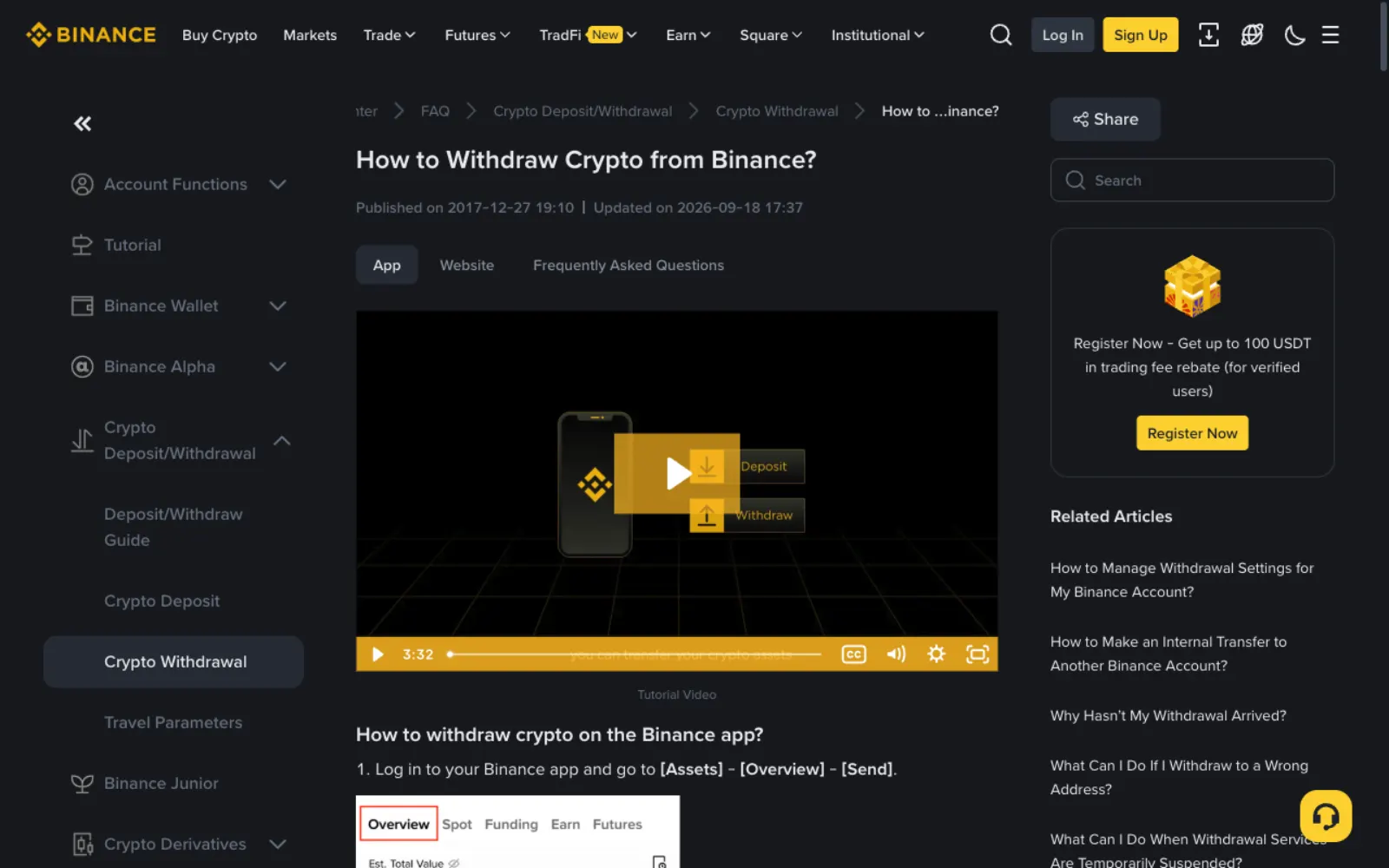
According to Binance's help centre, on the website go to Assets → Overview → Withdraw; in the app, Assets → Overview → Send, then withdraw to an address.
- Choose USDT and paste the recipient's address.
- Choose the network to match the recipient's. Binance warns explicitly: do not select the cheapest fee option; select the one compatible with the receiving platform.
- If the recipient needs a memo, enter it in the memo field.
- Enter the amount and note whether it is the receive amount (fee added on top) or the withdrawal amount (fee deducted).
- Confirm and verify with your passkey or 2FA.
What happens if you pick the wrong network
Binance's words: if you select the wrong network, your funds might be lost and not recoverable. USDT on Tron, Ethereum, BNB Smart Chain and others are separate and do not interoperate, and Ethereum and BNB Smart Chain addresses look identical.
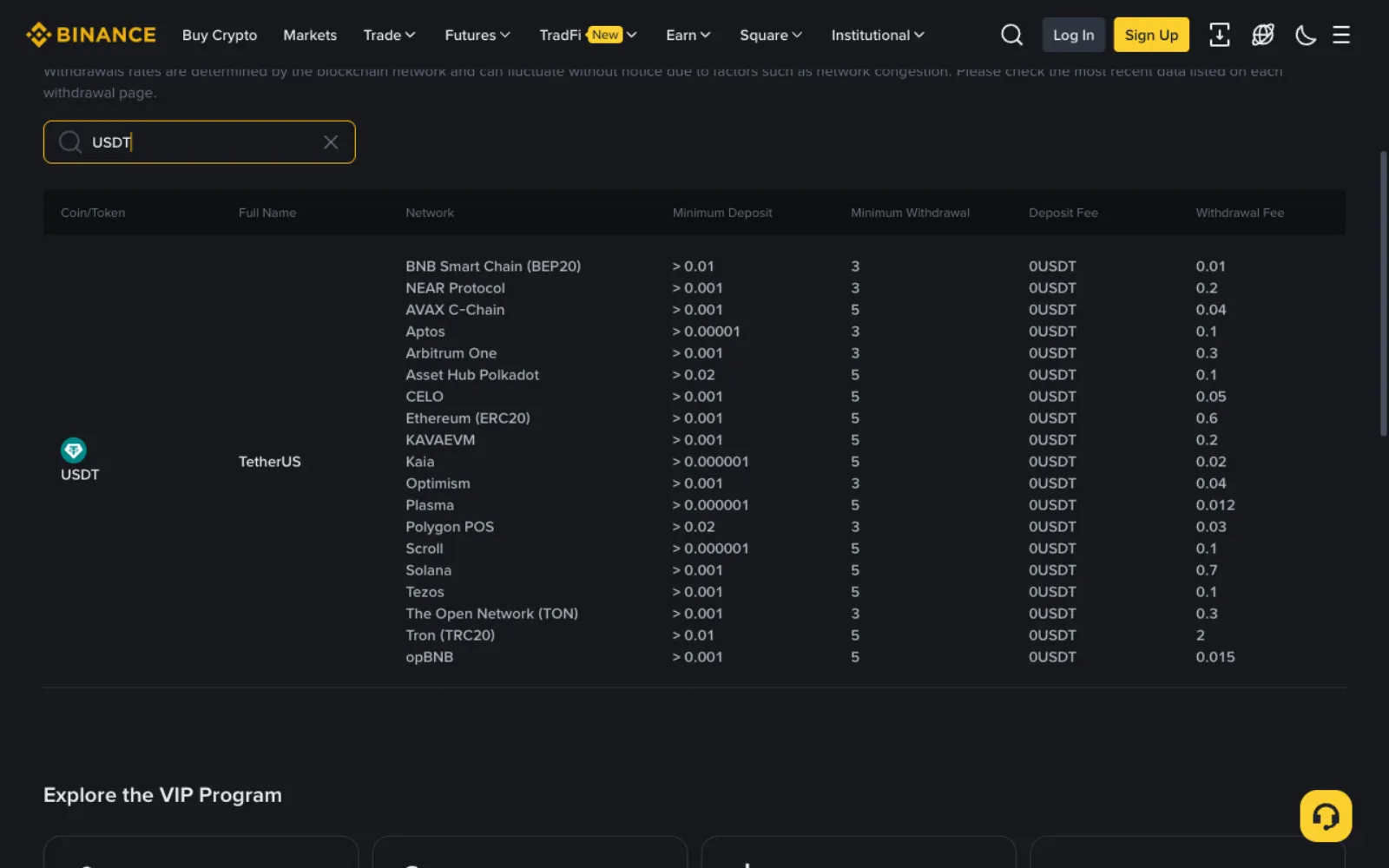
Fees differ by network, sometimes a lot. On the capture date Binance's USDT withdrawal fee was 0.01 on BEP20, 0.6 on ERC20 and 2 USDT on TRC20. But compare fees only among networks the recipient supports; never switch to one they do not just to save.
What a memo is and when you need one
On some networks an exchange gives many users the same deposit address and uses a memo (also called a tag, payment ID or comment) to tell them apart. Binance warns that if a memo is required and you leave it out, you may lose the funds.
Personal wallets usually need no memo; exchange deposits, especially on networks such as TON, often do. The rule is simple: if the recipient gives you a memo, always include it; if they did not, ask before sending.
Send a small amount first to a new address
Binance also suggests sending a small amount first when withdrawing to an address for the first time, then the rest once it arrives. One extra fee buys certainty.
If you often send to the same few addresses, turn on the withdrawal whitelist: withdrawals can then only go to saved addresses, so even a stolen login cannot easily move funds out.
Tracking the transfer
Once submitted, the transaction still needs confirming on the blockchain, which takes anything from seconds to tens of minutes depending on the network and traffic. Binance shows the status and transaction hash (TxID) under Orders → Transaction History.
Paste the hash into that network's block explorer (Tronscan for Tron, Etherscan for Ethereum) to see whether it succeeded and which address it went to. If the chain shows success but the recipient sees nothing, send them the hash so they can check their deposit records.
Five common beginner mistakes
Check against these before sending.
- Choosing the cheapest network when the recipient does not support it.
- Copying an address from chat with extra spaces or characters.
- Leaving out the memo on an exchange deposit.
- Choosing the withdrawal amount so the recipient gets less than required.
- Checking only the first and last characters, missing a swapped middle, the trick behind address poisoning.
Recipient also on Binance? Send internally for free
If the recipient also uses Binance, an internal transfer or Binance Pay using their Pay ID, email or phone number skips the blockchain, so there is no network to choose and no network fee. Like on-chain transfers, internal ones cannot be reversed, so check the recipient first.
Frequently asked questions
Can USDT sent to the wrong address be recovered?
If it went to a real address that was not the one you meant, it is essentially gone; you can only try contacting the owner. If it went to the right exchange on the wrong network, some exchanges offer paid recovery with no guarantee.
My withdrawal has been processing for a long time. What should I do?
Give it some time; confirmation takes a while. If it exceeds the platform's stated time, check Transaction History for a hash: with one, look it up on the block explorer; without one, it is still processing internally and you can contact Binance's official support.
Why did less arrive than I sent?
The fee came out of the amount. With the withdrawal amount option, the recipient gets the amount minus the fee. To deliver an exact amount, choose the receive amount and pay the fee on top.
My wallet only holds USDT. Why can't I send it?
Sending from your own wallet needs the network's native coin for the fee: TRX on Tron, ETH on Ethereum. Exchange withdrawals deduct the fee for you, so this does not arise. See where to keep USDT.
How much does sending USDT cost?
Exchange withdrawals charge a fee per network, which varies a lot; the withdrawal page shows it. From your own wallet you pay the network fee in its native coin, which changes with congestion.
Sources
This guide is based on the official pages and public material below, last checked on 2026-11-11. Platforms change their rules and products, so check the relevant page before you order.
- Binance: How to withdraw crypto from BinanceReviewed 2026-11-11
- Binance: Deposit and withdrawal feesReviewed 2026-11-11
- Tether: Supported protocolsReviewed 2026-11-11
Ready to buy your first USDT?
Check today's USDT P2P price and premium for your country first so you know the going rate. If you have no exchange account yet, signing up and verifying takes about a quarter of an hour.
"Create a Binance account" is our referral link: if you sign up through it we may earn a commission, and your prices and fees stay the same. How we handle referral links