
You tap Buy USDT on Binance P2P and nothing happens: the button is greyed out, a message says you can't trade, or the order is created and then cancelled. This is one of the most common beginner roadblocks. Usually nothing serious is wrong with the account; one trading condition isn't met yet. Verification may be unfinished, the payment method may not match, the amount may sit outside the ad's limits, or you may have used up today's cancellations.
This guide goes through the usual causes one by one, based on Binance's public help pages as of November 2026, and says how to recognise each one and what to do. In-app wording changes between versions and languages, so the sections are organised by cause rather than by exact message text. If you use Binance in Chinese, note that P2P is labelled C2C there; it is the same feature.
Key points
- Finish identity verification and turn on SMS verification plus at least one 2FA method
- Pay only with a method the ad accepts, from an account in your own verified name
- Advertisers can set requirements or ask for extra verification; if you don't qualify, pick another ad
- The amount must sit between the ad's minimum and maximum order limits
- You can have at most two open orders; three cancellations in a day blocks ordering until the day resets
- If you've already paid, don't cancel; if you cancelled by mistake, appeal the cancelled order
Start here: which situation are you in?
Failed orders fall into three groups: your account's own conditions, a mismatch between you and a particular ad, and daily limits. Find the closest row below, then read that section.
| What you see | Most likely cause | First step |
|---|---|---|
| No ad will take your order | Identity verification, SMS or 2FA not set up | Finish verification and security settings |
| Only some ads refuse you | The advertiser set requirements or asks for extra verification | Pick another ad, or filter for beginner-friendly ads |
| The amount is rejected | Below the ad's minimum or above its maximum | Change the amount, or pick an ad with suitable limits |
| Earlier orders are still open | You already have two open orders | Finish or resolve the open orders first |
| You cancelled a few times today and now can't order | Three cancellations reached for the day | Wait until 24:00 UTC+0 |
| The order disappeared after you created it | Payment time limit ran out and the system cancelled it | Pay and mark it paid within the time limit next time |
| Your currency or payment method isn't listed | Your country or currency isn't served | Check that Binance works where you live |
Cause 1: Verification or security setup isn't finished
This is the most common cause. Typically no ad will take your order and the app sends you to verification. Binance says all users must complete identity verification (KYC) to use P2P, and before trading on P2P you must also enable SMS verification and at least one 2FA device, such as an authenticator app or a security key.
The fix is simple: complete verification using our guide to Binance sign-up and identity verification, wait for approval, then go back to P2P. Submit your documents only on the official Binance website or app, never to someone claiming to be support.
- Open the identity verification page and check the status says verified, not pending or rejected.
- Add your phone number in security settings and turn on SMS verification.
- Turn on one 2FA method as well; an authenticator app is better than SMS alone.
- Go back to P2P and place the order again.
Cause 2: The payment method doesn't match, or you haven't added one
When you buy, you send local currency straight to the seller using a method their ad accepts. If the ad doesn't accept a method you can use, you can't complete the order. Use the payment-method filter at the top of the ad list to choose what you have, for example UPI in India, Raast in Pakistan or M-Pesa in Kenya; what is left are ads you can actually take.
When you sell, you first add your own receiving method, which the buyer pays into. In the Binance app the path is Trade, P2P, Profile, Payment Method: pick the method, enter the details and confirm with 2FA. You can add up to 20. On the website it is under More, Payment Methods. The full selling flow is in How to sell USDT on Binance P2P for the first time.
Names matter. Binance's P2P transaction policy says the platform does not support payment methods that aren't in your verified real name, and using one suspends your P2P functions for at least 7 days. Don't pay or receive through a relative's or friend's account either: third-party payments break the rules, and you bear the loss if something goes wrong.
Cause 3: The advertiser set requirements, or asks for extra verification
If only some ads refuse you while others work, the advertiser's conditions are the likely reason. Binance lets advertisers set thresholds that restrict who can respond to an ad, and its merchant help page says users who don't meet the criteria cannot place orders on that ad. The advertiser chooses these; you can't get around them, and there is no point asking for an exception.
Another case is an ad marked Verification. Some verified merchants ask buyers for extra identity documents after the order is created. Binance says you won't see the payment details until you complete that verification, and you should not pay before it is done. If you'd rather not share more documents, choose an ad without the tag.
The easiest route for a newcomer is the Beginner-friendly ads only filter. According to Binance, these are ads where the merchant set the counterparty's maximum completed orders to 0 and turned off extra verification, so only users with no P2P trades yet can see them. If any of these terms are new, see our P2P glossary.
Cause 4: The amount is outside the ad's order limits
Every ad shows a minimum and maximum amount per order next to the available quantity. Binance's own example: on an ad with limits of 100 to 400 USD you can't place a 99 USD order or a 401 USD order. If your amount is below the minimum or above the maximum, the order won't submit.
Change the amount, or type the local-currency amount you plan to pay into the amount box above the list first; the list then keeps only ads whose limits cover it. That is also the quickest way to find a low minimum for a small first order. For how to pick an ad, see the ad-selection step in How to buy USDT on Binance P2P for the first time.
Cause 5: You already have two open orders
Binance's buying guide says you cannot have more than two ongoing orders at the same time. If an earlier order is still waiting for your payment, or you've paid and are waiting for the seller to release, a third order will be blocked.
Check your Orders list. If an order is unpaid and you won't pay, cancel it under the rules. If you've already paid, wait for the release and appeal if it doesn't come in time. Never cancel a paid order just to free a slot.
Cause 6: Three cancellations in a day pause your ordering
Many blocked orders come down to earlier cancellations the same day. Binance lists the rules in its guide to cancelling a buy order (updated 29 December 2025, checked 11 November 2026):
Orders the system cancels for timing out count towards those three, and they also lower your completion rate. A lower completion rate can lock you out of ads that set requirements, so the habit of grabbing an order and cancelling if it doesn't suit you costs more than it seems. Once you're suspended there is no workaround; wait until 24:00 UTC+0. That is 5:30 in the morning in India, and 6 in the evening the previous day in Mexico City (UTC-6).
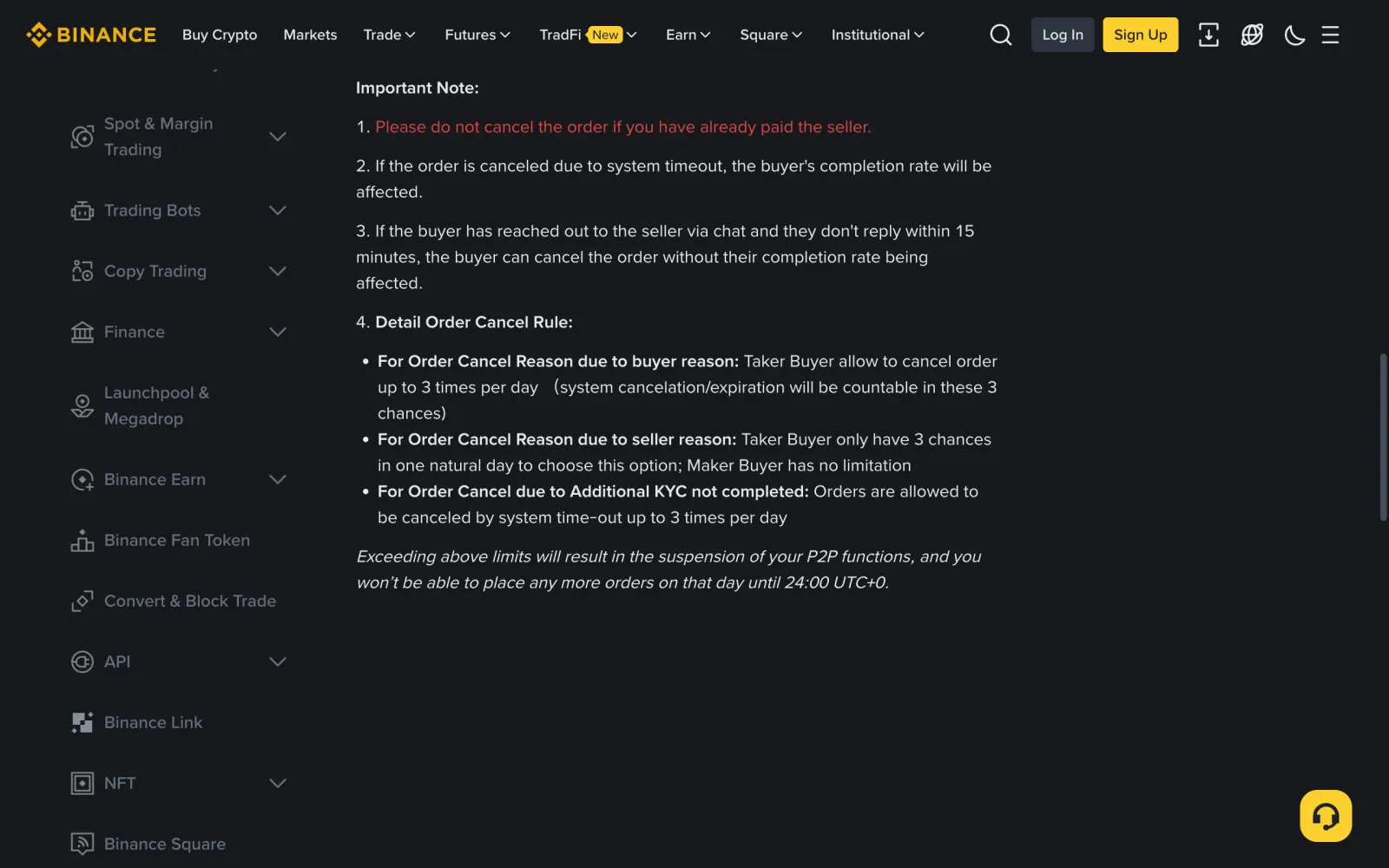
- Cancelling for your own reasons: as a taker buyer (you ordered on someone else's ad) you can cancel up to 3 times a day, and system cancellations and expiries count towards that.
- Cancelling for the seller's reasons: a taker buyer also has only 3 chances a calendar day to choose this reason; a buyer who posts their own buy ad has no limit.
- Orders cancelled by timeout because additional KYC wasn't completed: up to 3 times a day.
- Going over any of these suspends your P2P functions, and you can't place more orders that day until 24:00 UTC+0.
Cause 7: The order timed out and the system cancelled it
Every order has a payment time limit, set by the advertiser. Binance's transaction policy says the buyer must transfer the amount shown on the order page within the time the seller specifies; if you haven't paid and marked the order paid by then, the system cancels it. Binance also says that a taker buyer whose orders are cancelled for non-payment five times in a row can't buy as a taker for 24 hours.
To avoid timeouts, open your bank or wallet app before you order and make sure the transfer will go through and the balance is there. Pay straight after ordering, then go back to the order and tap the button to mark it paid and notify the seller. Remember that a cancellation uses one of the day's three chances whether you cancel yourself or the order times out.
Cause 8: Your country or currency isn't served
Binance does not serve every country, and P2P doesn't cover every currency. If your currency isn't in the P2P list, or the account says a feature isn't available where you are, it isn't something you're doing wrong, and switching ads or payment methods won't fix it. Check it works where you live before you sign up; the first section of our Binance verification guide covers this.
Local law matters too. In mainland China, for example, a February 2026 notice from the People's Bank of China and seven other agencies strictly bans exchanging fiat money for virtual currency and says overseas entities may not offer virtual currency services to people there. Our Chinese yuan page is a price reference only, with no buying method. For other countries' prices and whether a market is tradable, see the USDT rates overview.
You paid, then cancelled by mistake
The first note on Binance's cancellation page is: don't cancel the order if you've already paid the seller. If it's already cancelled, don't panic and don't pay a second time. Your money is in the seller's account, so the way forward is an appeal, which brings in Binance support.
Binance has an appeal route for cancelled orders. In the app: Trade, P2P, Orders, Fulfilled, then Canceled. Open the order, tap Need Help, choose a reason such as I paid but the order is cancelled, tap Appeal, describe what happened and upload proof of payment. For the evidence to prepare, see Binance P2P seller not releasing? How the appeal process works.
- Save the payment confirmation and your bank or wallet statement showing the amount, time and recipient.
- Tell the seller in the order chat that you paid and the order was cancelled by mistake.
- Appeal the cancelled order through the path above and upload your proof.
- Talk only through Binance's own appeal and support channels, and never pay again to a new account the other side sends.
Checked everything and still stuck
If verification, payment method, limits, open orders and cancellations all look fine, try another ad or try again later; sometimes the ad simply ran out of crypto. If it still fails, contact live support through the official Binance website or app and include a screenshot of the message you see so support can work out the cause.
Be wary of support agents who contact you first on social media or chat apps. They often promise to lift a restriction or place the order for you, then ask for a transfer or your verification codes. Real Binance support doesn't work that way. The common tricks are covered in The most common P2P scams when buying or selling USDT.
Frequently asked questions
How many cancellations before Binance P2P blocks new orders?
Under Binance's cancellation rules, a taker buyer can cancel for their own reasons up to 3 times a day, timeouts included. After that, P2P functions are suspended and you can't place orders until 24:00 UTC+0.
Why does one ad refuse me when others work?
Most likely that ad has requirements set by the advertiser, or a Verification tag asking for extra identity documents. If you don't meet them you can't order on that ad, so choose another one or filter for beginner-friendly ads.
Can I buy USDT on P2P without verifying my identity?
No. Binance requires identity verification for P2P, plus SMS verification and at least one 2FA method before you trade.
How many P2P orders can I have open at once?
Binance's buying guide says no more than two ongoing orders at the same time. Finish or resolve the open ones before placing another.
The order was cancelled but I already paid. What now?
Don't pay again. Find the cancelled order under Orders, tap Need Help, choose the reason that you paid but the order was cancelled, and appeal with your proof of payment.
I use Binance in Chinese and can't find P2P. Where is it?
In the Simplified Chinese edition P2P is labelled C2C; the P2P trade page title reads Binance C2C in Chinese. It is the same feature, with the same Express and P2P ordering modes.
Sources
This guide is based on the official pages and public material below, last checked on 2026-11-11. Platforms change their rules and products, so check the relevant page before you order.
- Binance: How to cancel your Binance P2P buy order (daily cancellation rules)Checked 2026-11-11
- Binance: P2P User Transaction PolicyChecked 2026-11-11
- Binance: How to buy crypto on the Binance P2P websiteChecked 2026-11-11
- Binance: Introduction to Binance P2P tradingChecked 2026-11-11
- Binance: What is the order limit on P2P trading?Checked 2026-11-11
- Binance: FAQ on the Binance P2P Merchant Portal (counterparty thresholds)Checked 2026-11-11
- Binance: FAQ on Binance P2P additional verification for adsChecked 2026-11-11
- Binance: How to post and filter beginner-friendly adsChecked 2026-11-11
- Binance: How to add new payment methods for P2P tradingChecked 2026-11-11
- Binance: How to appeal for canceled or completed P2P ordersChecked 2026-11-11
- Binance: P2P trade page, Simplified Chinese edition (labelled C2C)Checked 2026-11-11
- CSRC: Notice by the PBOC and seven other agencies on preventing and handling virtual currency risks (Yinfa [2026] No. 42)Checked 2026-11-11
Found a mistake or something out of date? Send the page link to hello@excxg.com. How we handle corrections
Ready to buy your first USDT?
Check today's USDT P2P price and premium for your country first so you know the going rate. If you have no exchange account yet, signing up takes a few minutes and identity checks take from minutes to a day or two.
Binance does not serve every country. Check it works where you live before you sign up. "Create a Binance account": Referral link · we may earn a commission. Signing up through it does not raise your prices or fees. How we earn commissions