
A friend is paying you back, a client wants to pay in USDT, or you are moving USDT from another platform, and the first thing they ask is: "What's your address?" That is your deposit address. Receiving costs you nothing and needs no withdrawal on your side, but you are the one who gives out the address and network. Give the wrong one and the USDT they send may be gone for good.
Using the Binance app and Binance's own help centre, this guide shows how to find your USDT deposit address on TRC20 and other networks, how to share it, what to check before and after it arrives, and the mistakes and scams that catch people on the receiving end. If you are the one sending, read how to send USDT instead.
Key points
- Ask which platform and network the sender is using, then pick the same network on your deposit page
- Share the address with the copy button or QR code and name the network; never make them retype it from a screenshot
- If your deposit page shows a memo, send the address and the memo together
- For a first payment, ask for a small test and wait for it to arrive
- Receiving USDT never needs your recovery phrase, private key, a verification code or any "activation fee"
What a deposit address is: the sender needs two things
A deposit address is a string of letters and numbers that works like your account number on one blockchain. In Binance's words, crypto is deposited via a deposit address: pick the coin and the network and the deposit page shows yours. Once the sender's transfer is confirmed on the chain, Binance credits it to your account.
To receive USDT you give the sender just two things: the deposit address and the network name, plus a memo on a few networks (covered below). The same coin has a different address on each network. TRC20 (Tron) addresses start with T; BEP20 (BNB Smart Chain) and ERC20 (Ethereum) addresses both start with 0x and look identical, so you cannot tell the network from the address alone. Always name the network when you share it.
- Fine to share: your deposit address, the network name and any memo the deposit page shows.
- Never share with anyone: your recovery phrase, private key, login password, SMS or email codes, or 2FA codes. Receiving needs none of them, and anyone who asks for them is almost certainly a scammer.
Ask which network the sender uses, then choose the same one
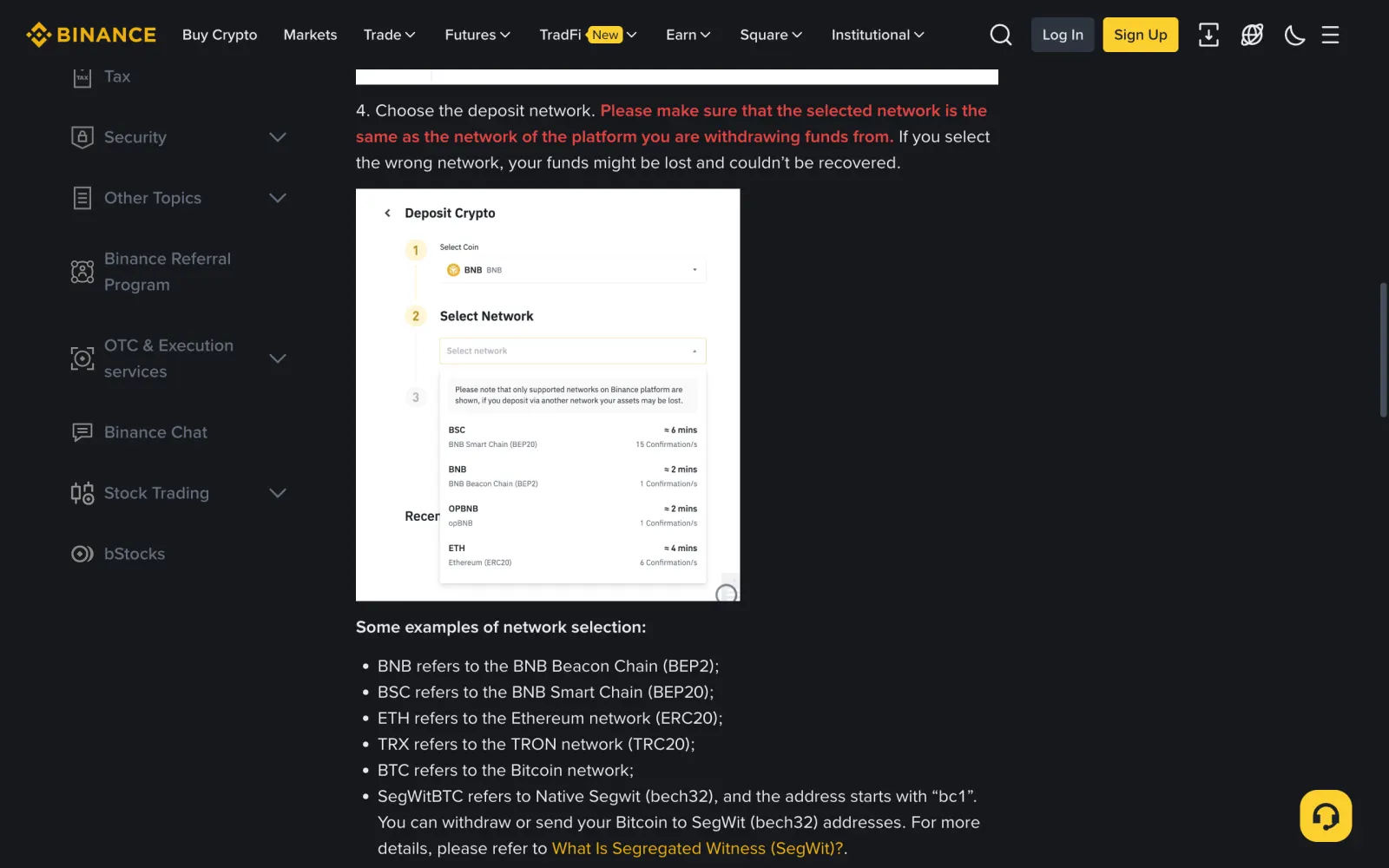
This is the step that matters most. Binance warns in red on its deposit guide: make sure the network you select is the same as the network of the platform the funds are coming from; pick the wrong one and the funds might be lost and cannot be recovered. Which networks you can use depends on what the sender's side supports. If their platform only supports ERC20, you must pick ERC20.
Binance also says do not choose the cheapest fee option; choose the one compatible with the sending platform. The sender pays the fee, not you, but the network has to be one both sides support. The table shows what Binance's fee page listed for USDT on the three common networks when we checked on 2026-11-11. These numbers change, so go by the deposit and withdrawal pages.
| Network (Binance label) | Address starts with | Binance minimum deposit | Sender's fee to withdraw from Binance |
|---|---|---|---|
| Tron (TRC20) | T | Over 0.01 USDT | 2 USDT |
| BNB Smart Chain (BEP20) | 0x | Over 0.01 USDT | 0.01 USDT |
| Ethereum (ERC20) | 0x | Over 0.001 USDT | 0.6 USDT |
Finding your USDT deposit address in the Binance app
Following Binance's help centre: in the app it is Deposit → Deposit Crypto; on the website, Deposit → Deposit Crypto from the side panel. Using TRC20 as the example:
- Log in to the Binance app, tap Deposit and choose Deposit Crypto.
- Choose USDT, not a coin with a similar name.
- Choose the network: if the sender said TRC20, pick Tron (TRC20); if BEP20, pick BNB Smart Chain (BEP20).
- The page shows a QR code and the deposit address for that network. If it also shows a memo, note it down.
- Tap the copy icon to copy the address, or tap Save and Share Address to save the QR code and send it.
- Under More Details you can choose whether the deposit goes to your Spot Wallet or Funding Wallet. If unsure, leave the default.
When you also need to send a memo
A memo (also called a tag or payment ID) is the number an exchange uses to tell whose deposit is whose. On some networks many users share one deposit address, and only the right memo puts the money in your account. Binance names TON, XLM, XRP and EOS among the networks that need one.
USDT on TRC20, BEP20 and ERC20 normally needs only the address. But if your deposit page shows a memo for the network you picked, send the address and memo together and tell the sender to fill in both fields. According to Binance, a missing or wrong memo means the deposit is not credited automatically; you have to apply for recovery, and a recovered deposit is returned to the sender's address minus a fee.
For a first payment, ask for a small test
The first time you receive from a new person or platform, ask them to send a small amount first and send the rest only after it arrives. One extra withdrawal fee is cheap insurance against getting the whole amount wrong.
The test must be above the minimum deposit. Binance says deposits below the minimum are not credited and cannot be recovered. When we checked, the minimum for USDT on TRC20 was over 0.01 USDT, but withdrawing from Binance on TRC20 cost the sender 2 USDT, so a test of a few USDT is plenty.
Checking arrival: deposit history and block explorers
After the sender submits the transfer, it needs enough confirmations on the chain before Binance credits it. How long that takes depends on the network and congestion; the network list on the deposit page shows the expected time and confirmations.
In the app, go to Wallets → Spot and tap the transaction history icon; on the website, Wallet → Transaction History. If it is not there yet, ask the sender for the transaction hash (TxID) and look it up on the network's block explorer:
- Use Tronscan for TRC20, BscScan for BEP20 and Etherscan for ERC20. Paste the TxID into the search box.
- Check the status shows success and confirmed.
- Check the recipient (To) address is the one on your deposit page, comparing the start and end character by character.
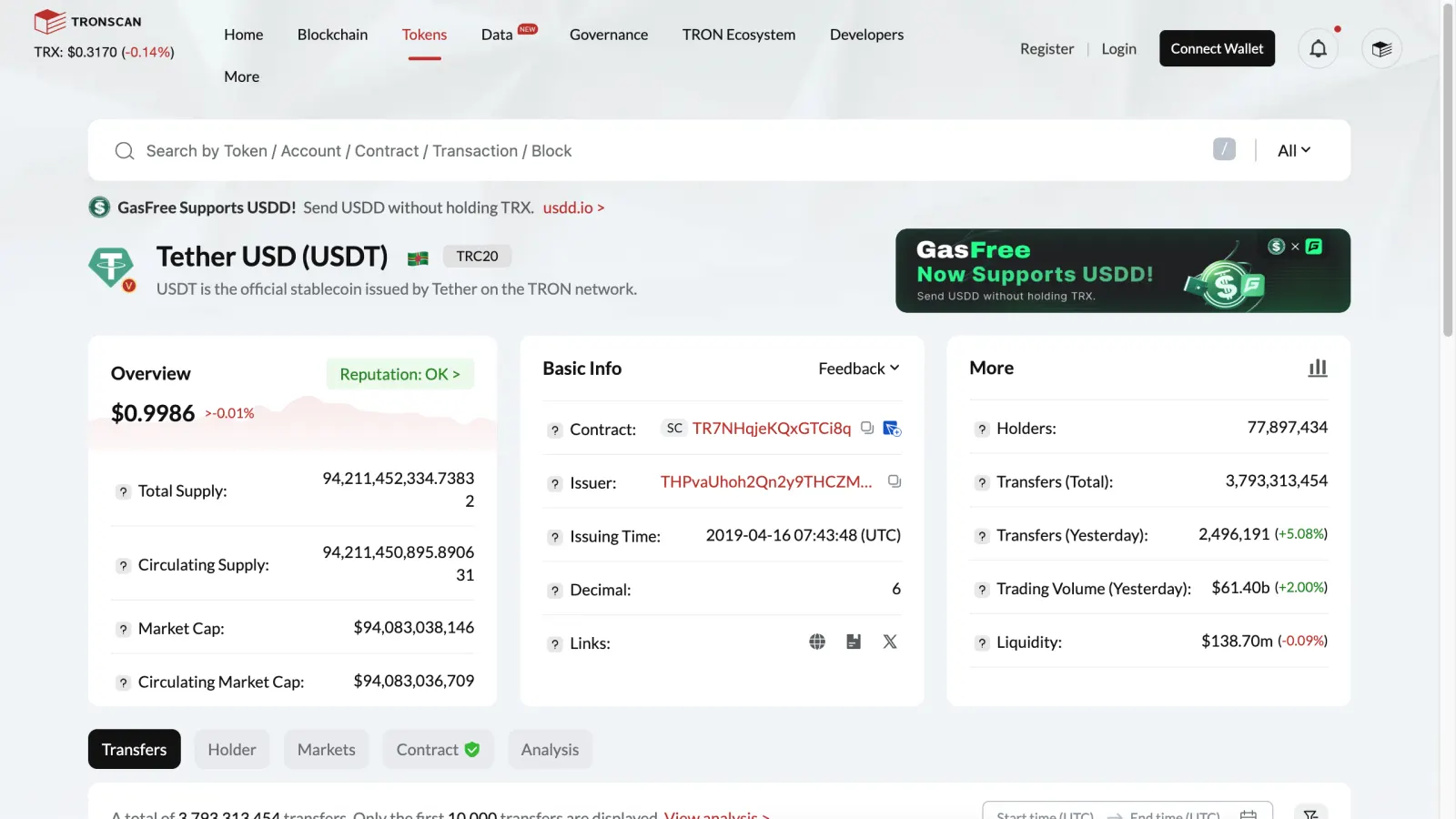
- Check it is real USDT: on Tronscan the token should be Tether USD (USDT) with contract address TR7NHqjeKQxGTCi8q8ZY4pL8otSzgjLj6t.
- If it succeeded on the chain, the address matches and Binance still has not credited it, work through the "sent but not received" checklist below.
A contract address is not your address, and fake USDT exists
Search for USDT on Tronscan and you will see TR7NHqjeKQxGTCi8q8ZY4pL8otSzgjLj6t, an address starting with T. That is USDT's contract address on Tron, the program behind the token itself, and Tether's supported-protocols page lists it. It does not belong to you or to anyone as a receiving address. Beginners sometimes share it as "the USDT address"; money sent there does not reach your account, and Binance says it cannot help with transfers to addresses that do not belong to Binance.
What the contract address is good for is checking whether a token is genuine. Anyone can issue a token called "USDT" and send it to your address; Trezor's security guide notes that scammers send tokens that appear to be a popular token but are worthless. Go only by whether the deposit appears in your Binance history, or check the token's contract address on the explorer. If an unexplained "USDT" shows up in a wallet, do not click any link attached to it or try to "swap" it on some website.
Sender on Binance too, or buying on P2P: no deposit address needed
If the sender also has a Binance account, the transfer can skip the blockchain: they use Binance Pay with your Binance ID, email or phone number, or scan your receive QR code. Binance's help centre says the crypto is credited to your Funding Account, so no deposit address is involved and the wrong-network problem cannot happen. See Binance Pay versus on-chain transfers for the differences.
Buying on Binance P2P works the same way: once the seller releases, the USDT lands in your Binance account and you never give anyone an address. If a P2P seller asks for your deposit address so they can send it outside the platform, that is an off-platform deal without escrow and without an appeal route. The full buying flow is in your first Binance P2P purchase.
They say it's sent but nothing arrived: check in this order
Binance's "why hasn't my deposit been credited" page lists the usual causes. Before asking the sender to pay again, go through them in order:
- Still confirming: Binance credits only after its required confirmations. Wait, and watch progress on the block explorer with the TxID.
- Wrong network or token: the sender used a network Binance does not support, or sent something that is not real USDT. Binance generally does not offer recovery for these; it may help at its discretion with significant losses, and success is not guaranteed.
- Wrong address or memo: a missing or wrong memo can go through Binance's memo/tag recovery application; a deposit to a retired old address can be credited with One Click Arrival in your transaction history.
- Below the minimum deposit: these are not credited and cannot be recovered.
- Wallet maintenance: deposits on a network pause during maintenance; check again once it ends.
- If none of these apply, contact Binance support through the official help centre with the TxID, amount and time. Only use the app or website; ignore anyone on social media claiming to be support.
The most common receiver mistakes and scams
Receiving feels passive, but each of these is something the receiver can prevent. More P2P and transfer scams are in common P2P USDT scams.
- Giving the address without the network, so the sender uses a different one.
- Sharing the USDT contract address from Tronscan as if it were your own.
- Using an old address from a months-old chat, or copying one from transaction history and picking up a scammer's lookalike "poisoned" address with the same start and end.
- Picking a network that needs a memo and sending only the address.
- Believing you must pay an "activation", "unfreezing" or "deposit" fee before you can receive. Binance does not charge deposit fees, and receiving never requires you to pay first.
- Sending a verification code or recovery phrase to "confirm your identity" and losing the account balance.
- Accepting large unexplained USDT from a stranger. It may come from stolen or criminal funds, and Tether's terms of service let it freeze USDT held at an address. See what to do about "dirty" USDT.
Frequently asked questions
Is a TRC20 address the same as an ERC20 address?
No. TRC20 is the Tron network and its addresses start with T; ERC20 is Ethereum and its addresses start with 0x. Your Binance account has a different deposit address on each network, so pick the sender's network and copy the address shown for it. BEP20 and ERC20 addresses share the 0x format, so always state the network.
Does receiving USDT cost anything?
Binance does not charge deposit fees. The sender pays the network fee: withdrawing from Binance costs a per-network fee, 2 USDT on TRC20 when we checked on 2026-11-11. If the sender enters the withdrawal amount rather than the receive amount, the fee comes out of it and you receive less than they typed.
Can I use the same address every time?
A deposit address on one network can usually be reused, but Binance retires old addresses in batches and emails affected users. The old address expires once you get a new one, or 30 days after the email, and later deposits to it are not credited automatically. Copying a fresh address from the deposit page each time avoids the problem.
The sender says I must pay an activation fee first. Is that real?
No. Receiving needs only an address and network, and Binance charges no deposit fee. Anyone asking for an activation, unfreezing or security fee is running a scam. Receiving also never needs your recovery phrase, private key or verification codes.
How do I turn received USDT into local currency?
You can sell it to another user on Binance P2P and receive local currency in your bank account or wallet. Check today's sell price for your currency on USDT rates by country, then follow your first Binance P2P sale. Unfamiliar terms are explained in the P2P glossary.
Sources
This guide is based on the official pages and public material below, last checked on 2026-11-11. Platforms change their rules and products, so check the relevant page before you order.
- Binance: How to Deposit Crypto to BinanceChecked 2026-11-11
- Binance: Why Hasn't My Deposit Been Credited?Checked 2026-11-11
- Binance: Frequently Asked Questions on Incorrect DepositsChecked 2026-11-11
- Binance: How to Retrieve Crypto Deposit with Wrong or Missing Tag/MemoChecked 2026-11-11
- Binance: Why Is My Deposit Address Being Retired?Checked 2026-11-11
- Binance: Deposit and withdrawal feesChecked 2026-11-11
- Binance: How to Send Cryptocurrency to an Individual with Binance PayChecked 2026-11-11
- Tether: Supported protocols and contract addressesChecked 2026-11-11
- Tether: Terms of ServiceChecked 2026-11-11
- Tronscan: Tether USD (USDT) TRC20 token pageChecked 2026-11-11
- Trezor: What are address poisoning attacks and how to avoid themChecked 2026-11-11
Found a mistake or something out of date? Send the page link to hello@excxg.com. How we handle corrections
Ready to buy your first USDT?
Check today's USDT P2P price and premium for your country first so you know the going rate. If you have no exchange account yet, signing up takes a few minutes and identity checks take from minutes to a day or two.
Binance does not serve every country. Check it works where you live before you sign up. "Create a Binance account": Referral link · we may earn a commission. Signing up through it does not raise your prices or fees. How we earn commissions